Void Linux is a GNU+Linux distro with runit as its init system instead of SystemD. In my experience it is lightweight, responsive – even lighter compared to Arch Linux and follows Unix philosophy better than any other common distros. It follows BSD principles too. Which would ease the conversion for people considering BSD to get away from SystemD, but allow them to stay on the GNU+Linux ecosystem at the same time.
Runit is amazingly simple. Everything is a file in the filesystem. At first I thought it would be painfully difficult to get used to a new init system. But it was surprisingly very easy. Trust me, there are around 5 commands, and even those are quite similar to SystemD. So the transition would be very smooth for anyone hoping to get into Void. As a reward, you’ll get yourself a fast and responsive machine.
Void Linux is smooth so far and feels stable. I’ve seen some people vouch for its stability even though it’s a rolling release distro. As it gave me so much, I thought I would contribute back to it. I was amazed to find most of the packages on the repo. But found some packages that should be an excellent addition to this wonderful distro. So thought of submitting some missing packages. I thought I would document the process so that anyone can follow along in future if needed.
Void Linux has a GitHub repo https://github.com/void-linux/void-packages/ that keeps all the package build codes and templates. A build system automatically builds the repo and rolls out the updates to users. So the submitting process pretty much revolves around this repo.
1: Getting prepared
- If not already, create an account on GitHub. Unfortunately, a GitHub account is necessary to submit new packages. Note: GitHub does not run on Free Software completely, so it violates users’ freedom.
- Sign in to GitHub
- Go to https://github.com/void-linux/void-packages/
- Click the Fork button. You will have a copy of the void-packages repo in a new repo under your username. e.g. https://github.com/reback00/void-packages

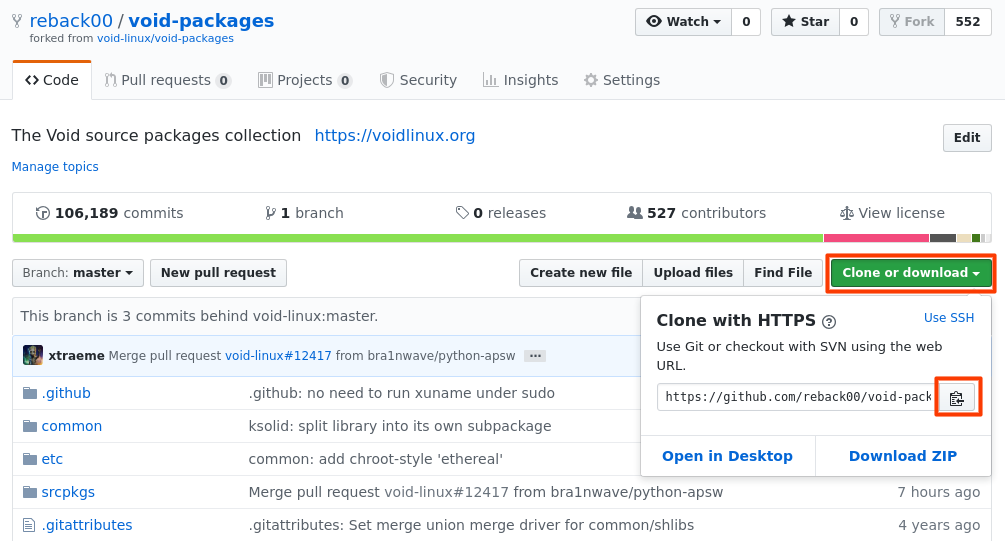
- While on the forked repo, click Clone or download button and copy the URL
- Open a terminal and type “git clone” followed by a space and then the URL. e.g. git clone https://github.com/reback00/void-packages.git
- Then cd into the repo folder and add the upstream repo:
cd void-packages
git remote add upstream https://github.com/void-linux/void-packages.git
2: Starting for a new package
- Before you start working on a new package, pull the updated code from master:
git checkout master
git pull --rebase upstream master
- Make sure to switch to
masterbranch before creating a new branch. If you don’t switch to master branch, it will include any other changes made to other branches.
git checkout master
- Now create a new branch for your package to keep things separate:
git checkout -b my-cool-new-package-branch
* Replace my-cool-new-package-branch with your package name followed by a -branch. e.g. ddgtk-branch
- Now create and prepare the package as usual. Be sure to test it before finally pushing. If you are unsure how to, check this article here.
3: Pushing the package
- To push the package, first test if it is correctly formatted:
xlint srcpkgs/my-cool-new-package/template
* Here, replace my-cool-new-package with your package name. e.g. ddgtk
- If there are no errors, continue. If there are errors, be sure to fix them first.
- Now, if you are ready to push the package, run these:
git add srcpkgs/my-cool-new-package
git commit -m "New package: my-cool-new-package-1337"
Note: You will have to follow the commit rules when committing. In case of new packages it is “New package: <pkgname>-<version>”. In case of updates: “<pkgname>: update to <version>”. In case of any updates to fix the pull request, without changing the revision number, use: “<pkgname>: <reason>”.
- Now push the changes to GitHub:
git push -u origin my-cool-new-package-branch
If everything goes well, you should see a message similar to this: “Branch ‘ddgtk-branch’ set up to track remote branch ‘ddgtk-branch’ from ‘origin’“.
- Now refresh the repo page that you forked earlier. e.g. https://github.com/reback00/void-packages
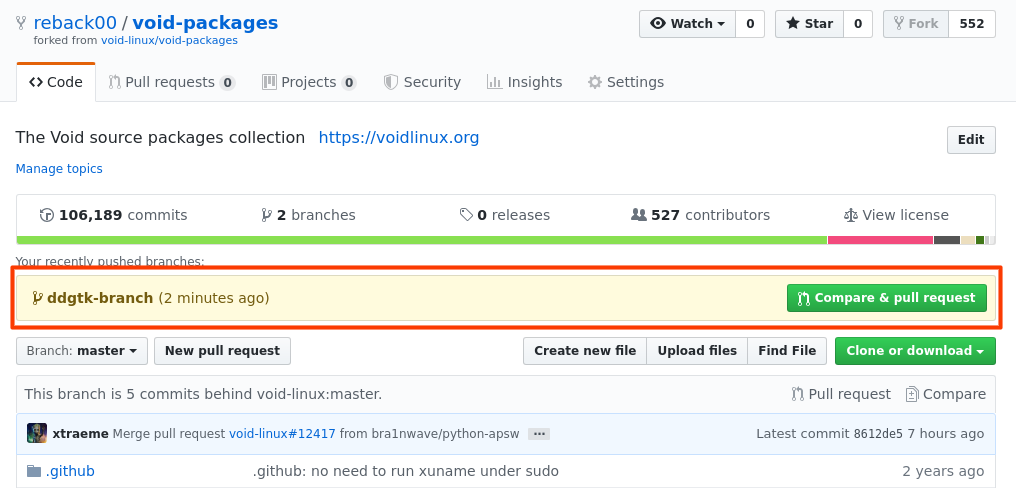
You should see a Pull request option like above (shown inside Red box).
- Click the “Compage and pull request” button. It will bring up a form like this:
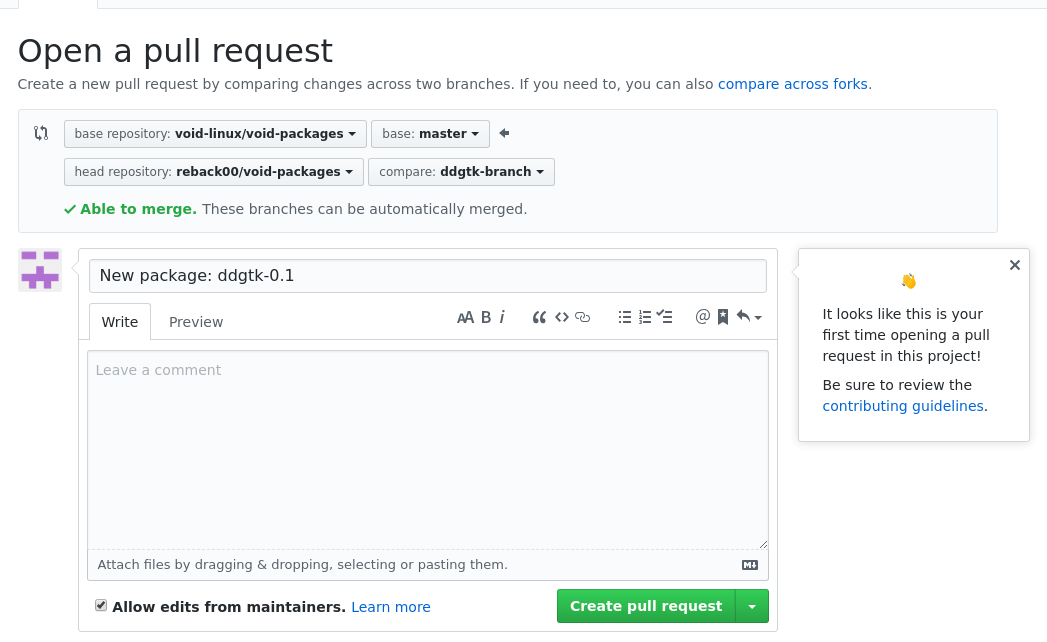
- Fill out the form with details and click “Create pull request”
- If everything is successful, you should see a screen like this with your pull request:
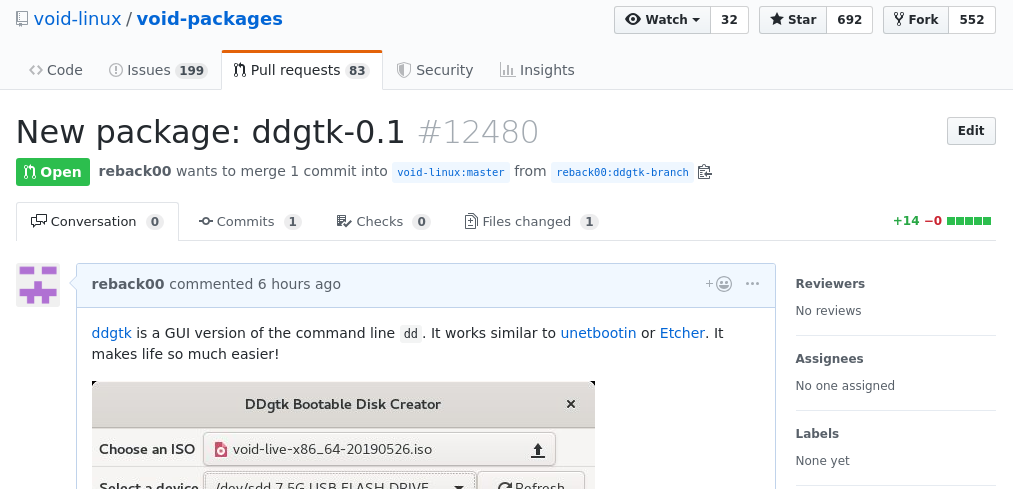
Keep an eye on the Travis CI area at the bottom of the page. It builds the package in an emulated environment and lets you know if there are any errors. If there are, you should solve it ammend commit (follow the “Following up” heading below), or ask on the request page if anyone knows the solution.
If no errors, congratulations! Your package will be up for consideration to be included.
4: Following up
If the Travis CI fails, you won’t have to re-submit a Pull request. If there are any changes you want to make to fix the build, you can ammend changes to the last commit:
git add srcpkgs/my-cool-new-package/
git commit --amend
git push -f
When you run the –amend command, it will ask for a commit message in a vim editor. Since we are just amending changes to the previous commit, keep the previous message (New package: <pkgname>-<version>) intact and save (press <ESC>:wq<ENTER>).
After you push -f, the Travis CI build process will run again and you can check if it succeeds. Or else try again or ask what you can do to solve your error in the PR page. There are wonderful people to help you there. (They are friendlier than Arch Linux people!)
So there you have it. This is how you push a new package to Void Linux repo. Hope you have fun.
Resources:
 Reblog00